
Watch the video below and follow the step-by-step guide to effectively use this device.
1
step 1
Take A Measurement
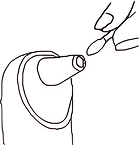
Wait for the gateway LED to spin yellow. Point the thermometer at the center of the forehead. press the button to take reading. To take in-ear measurements, consult your care provider.

2
step 2
Daily Measurements
Take one measurement per device each day unless advised otherwise by your healthcare provider. The LED on the Gateway will turn red each morning and then turn green once a measurement has been successfully transmitted.

3
step 3
Cleaning

For patients using more than one device, the light on top of the Gateway provides a simple way to confirm that all daily readings have been completed.The circular LED light is divided into equal sections, with one section assigned to each device in use. When a device successfully sends a reading to the Gateway, its corresponding section turns green. Once every device has sent a reading for the day, the entire light will appear green.
