
Watch the video below and follow the step-by-step guide to effectively use this device.

1
step 1
Insert Oximeter Batteries
Plug your Gateway into a power outlet with the provided power cord and wait until the LED on the gateway turns red.
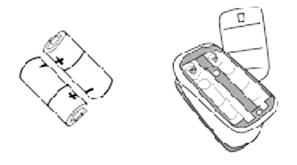
2
step 2
Insert Finger Into Pulse Ox
Insert one finger completely into the measurement section of the Oximeter with your fingernail pointing up towards the screen

3
step 3
Starting the Device
Ensure you are within 20 feet of the Gateway.

4
step 4
Taking your Measurement
Remove the device from your finger; it will power down automatically and send the measurement to the Gateway.


For patients using more than one device, the light on top of the Gateway provides a simple way to confirm that all daily readings have been completed.The circular LED light is divided into equal sections, with one section assigned to each device in use. When a device successfully sends a reading to the Gateway, its corresponding section turns green. Once every device has sent a reading for the day, the entire light will appear green.

